The annoying version of this question arrives in the middle of a change. Claude Code stops, the message is some form of "limit reached," and the only fact you have is that you cannot continue. Which limit, and what time it comes back, is the part the message is bad at.
On Pro and Max there are two clocks. The 5-hour limit starts at your first message and resets in full five hours later. That is the whole answer when the title of this note is the question you actually have: it does not reset at midnight, and it does not reset on the hour. Usage inside that window also counts toward the weekly limit. The weekly limit resets at a fixed day and time for your account, the one shown in Settings, then Usage. Max and Ultra have a separate weekly limit on Fable. All of this is shared between Claude Code and the Claude apps, so a long chat on the phone spends the same allowance. Verified Ultra accounts have had no 5-hour limit since October 30, 2026. That is the day Anthropic renamed Max 5x to Max $100 and Max 20x to Ultra $200. If usage credits are on, going past a limit is billed at API rates.
What the Limits page actually draws
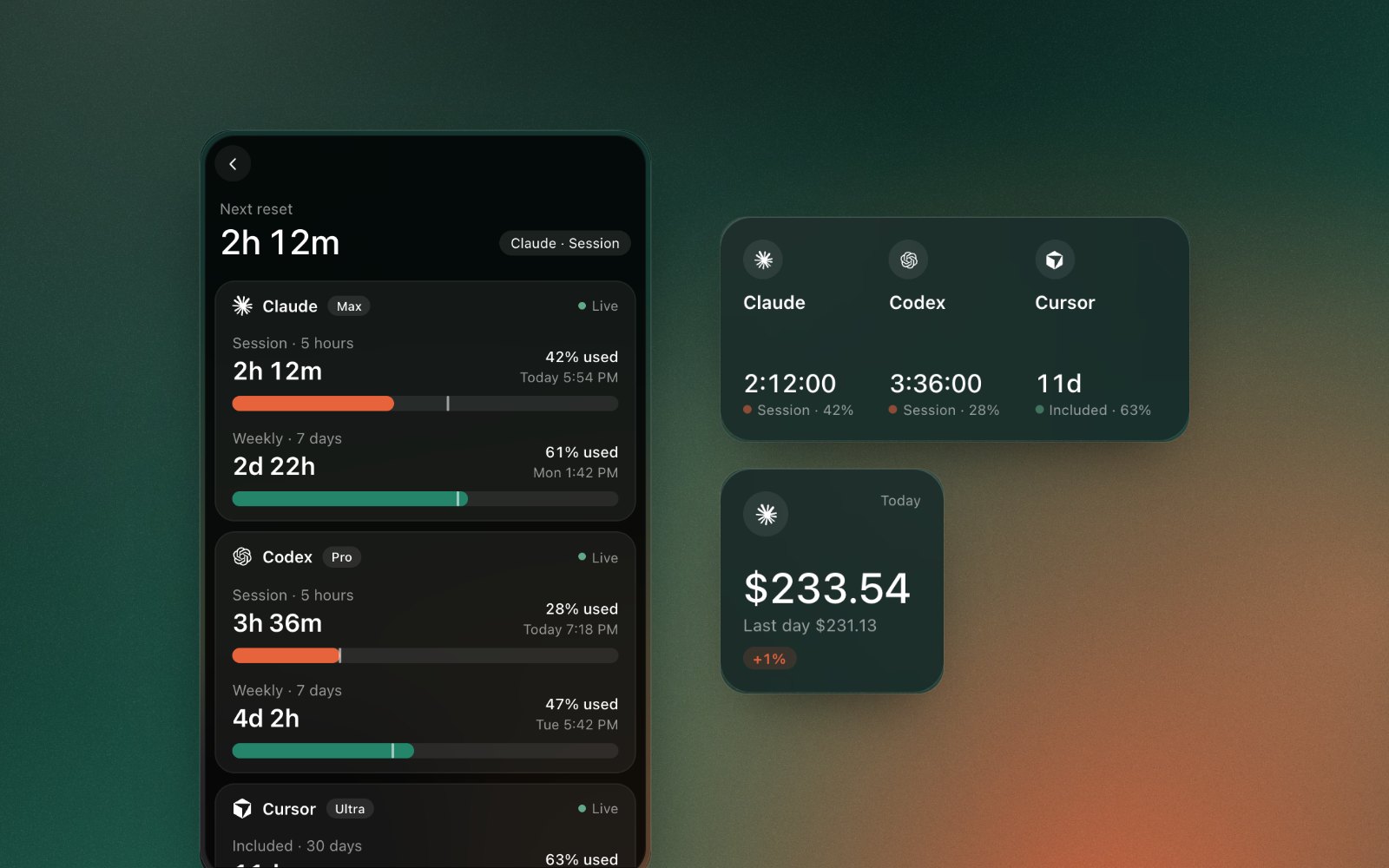
Minto puts Claude, Codex, and Cursor on one screen. On Pro and Max, the Claude rows are the 5-hour limit and the weekly window. Each row has a percent used, a countdown, and the time it resets. The length of the window is printed on the row. For Claude's 5-hour limit that length is 5 hours. The weekly row is the longer one. Verified Ultra accounts have no 5-hour limit. For those accounts Minto shows the weekly limit and the weekly Fable limit, the same as Claude's own usage page.
At the top, "Next reset" is whichever window comes back first. If Claude's session resets in two hours and the weekly window resets in three days, the big number is the session. That is the one that unblocks the task in front of you. The weekly number is why "it reset and I still can't" happens.
The bar under each row is not just a fill of the percent. There is a mark for how far through the window the clock has moved. Percent used ahead of that mark means you are spending the allowance faster than the window is passing. That is the difference between "I'll be fine until this resets" and "this resets and the next one will be gone by lunch." We cared about that mark more than a second copy of the percentage. A percent with no clock is how you get surprised.
Codex gets the same treatment: the usage windows OpenAI reports for your plan, each with a percent and a reset. Cursor shows the usage Cursor reports for your account.
The cover on this page is that Limits screen. The figures in it are demo data. The layout is the real one.
The percents are not priced out of the log. Spend for Claude Code and Codex is read from the logs on the Mac. Signing in to Claude only reads the usage percentages. There is no Minto account in the middle.
The menu bar is the session, not the essay
The menu bar item has three states. The icon. Today's cost. Or today's cost with a ring for the 5-hour limit. Verified Ultra accounts have no 5-hour limit, and for those accounts Minto shows the weekly limit and the weekly Fable limit, the same as Claude's own usage page. The ring is that 5-hour limit, not the weekly window, and not Codex. We picked Claude's session because that is the limit that stops a working afternoon. Weekly is a thing you open the panel for.
If the ring is visual noise, "Today's cost" is the quieter setting. Icon only is there for people who already know they're fine. All three are in the menu, and again under Menu Bar Shows in the ⋯ menu.
There is also a Plan Limits widget. It shows the countdown for each tool's first window, with the percent beside it. Today is the other small widget: what you spent today against the last day you used the tool. The other three widgets are This Month, Top Projects, and Models. They answer a different question, the one about money rather than the reset.
Blocks are the five hours, listed
The session percent says how full the allowance is. The Blocks screen is the five-hour block itself. Claude Code's usage from the local log is grouped into those blocks, the same way ccusage builds them. The blocks only see Claude Code on this Mac, while Anthropic's limit also counts the Claude apps. The current one shows what it has cost so far, the token count, the models in it, and how much of the five hours is left. Earlier blocks are listed under it, with a start time and a total.
Those two numbers get confused, so: a block can be four hours old with the session allowance still half empty, or ninety minutes old and already full. The Blocks screen is the clock and the estimate. The Limits row is the plan. When they disagree, the plan is the one that stops Claude Code.
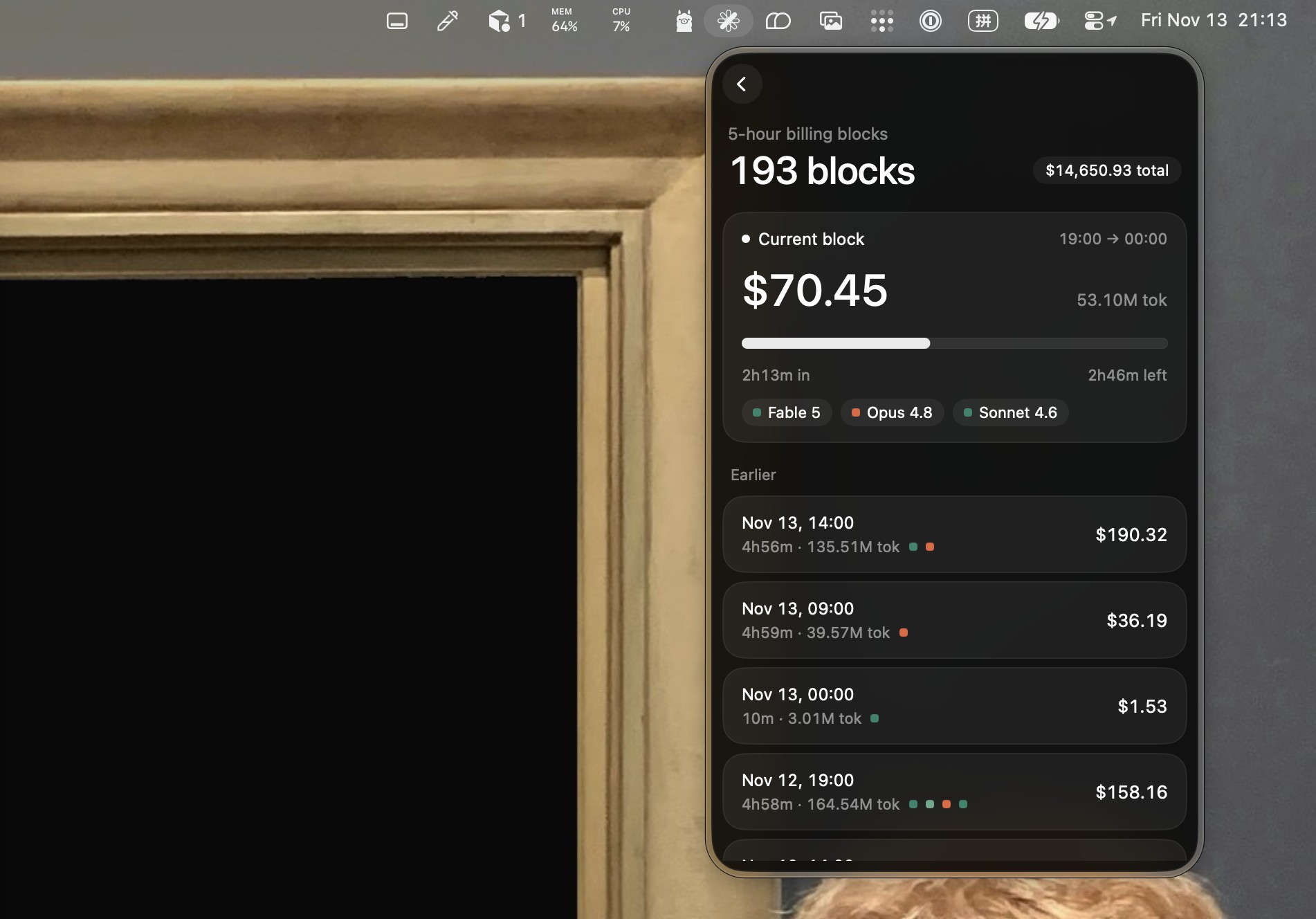
The dollars and model names in that picture are demo data, same as the Limits screen.
The cost on a block is an estimate. Tokens are counted the way ccusage counts them, prices come from LiteLLM's public list, and we test Minto's totals against ccusage's own results. A subscription does not charge you the list price of the tokens. If the block says forty dollars and your plan is a flat monthly fee, you were not billed forty dollars for that block. (Unless you turned on usage credits and went past a limit; that part is billed at API rates.) The plan's bill is the final word. The estimate is for comparing today with last Tuesday, and for seeing which model did it. How that split works is the other note: what Claude Code costs, by model and by project.
What we left out
We don't raise your limit. There is no Minto account. The app does not upload the logs. It goes online to fetch the price list. macOS 14 or later. The download is free, and has been. No ads.
If you want the same counts in a terminal, keep ccusage. We use it as the check, which is why the Mac version of that comparison is its own page: ccusage on a Mac.
The product page is Minto. The install is the Mac App Store.