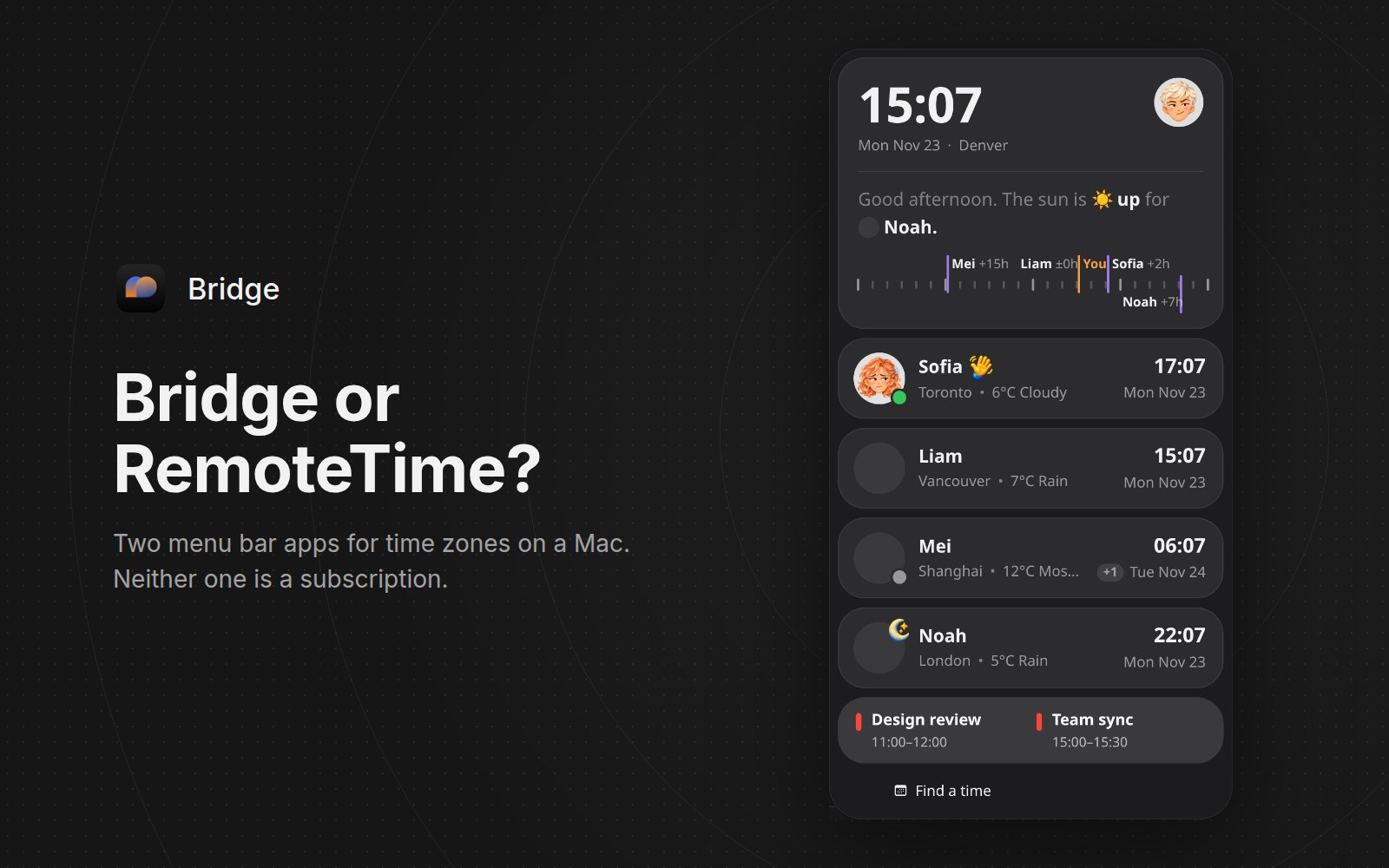
RemoteTime and Bridge are both Mac menu bar apps for working across time zones, and neither is a subscription. RemoteTime is a free world clock built around cities that shows live times in the menu bar, with an optional €9.99 one-time Pro license. Bridge, which we make, is built around the people you work with: their time, weather and public holidays. It runs in full for 3 days, then Unlock Bridge is $9.99 in the US, paid once.
If you want city clocks in the menu bar for free, RemoteTime is the better fit. If you want to see each teammate's public holidays and book a meeting straight into your calendar, Bridge is the better fit.
RemoteTime announced its launch on X on November 18, 2026. Everything about RemoteTime below comes from remotetime.app, which we read on November 23. We haven't run it ourselves.
Bridge vs RemoteTime: features and price
| RemoteTime | Bridge | |
|---|---|---|
| Price | Free core app. Pro is €9.99, paid once | Free download, full app for 3 days. Unlock Bridge is $9.99 in the US, paid once |
| Built around | Cities (34,000+ in an offline list) | People: a card per teammate with name, picture and city |
| Times in the menu bar itself | Yes, you pick which locations | No, only the Bridge icon. Times are in the panel |
| Finding a meeting time | Scans the next 7 days for the best shared 09:00–18:00 window | Find a time: pick people, a day and a length; choose a time and add it to your calendar |
| Public holidays | Pro only, as an icon on each location. Needs a connection, and countries that aren't covered show no icon | Included: a tag on the person's card and their next few holidays |
| Weather | Not listed | Yes, on each card |
| Other extras | World map, copy a time to the clipboard; sunrise, sunset and moon phase in Pro | Today's calendar events; a picture on each avatar for sunrise, sunset and the small hours; link teammates through iCloud to see when they're at their Mac and send stickers |
| Where you get it | ZIP download from remotetime.app, signed and notarized by Apple | Mac App Store |
| License | Key you paste in Settings, tied to one Mac; deactivate it to move to a new one | In-app purchase on your Apple Account |
| Requirements | macOS 14 or later, Apple silicon only | macOS 15.6 or later |
When RemoteTime is the better choice
The free tier is the biggest difference. RemoteTime's free app has unlimited locations, the menu bar clocks, the what-if time marker, date stepping, the world map and the 7-day overlap finder. Bridge runs in full for 3 days, and after that it needs the $9.99 unlock. If you only need clocks and an overlap, RemoteTime costs nothing.
RemoteTime shows live clocks in the menu bar, and Bridge puts only its icon there. We kept Bridge's menu bar to one icon so it wouldn't crowd the clock that's already there, and the times are one click away in the panel. If you want to check Tokyo's time without clicking an icon, RemoteTime does that.
RemoteTime's overlap finder looks across a week. Bridge's Find a time works on the day you pick, so finding the best day is up to you. RemoteTime also lets you step whole days forward or back, with each zone's daylight saving rules applied, so you can check how a call lands next month.
RemoteTime runs on older macOS. It needs macOS 14 Sonoma; Bridge needs macOS 15.6. The catch is that RemoteTime is Apple silicon only, so it won't run on an Intel Mac.
RemoteTime's core features work offline. The city list ships inside the app, and its site says the only network call is the optional Pro holiday lookup. Bridge goes online for weather and public holiday dates.
When Bridge is the better choice
In Bridge you add people rather than cities. Add Sofia and pick Toronto, and her card shows her local time, the weather there, and whether today is a public holiday where she lives. Open her card for her next few holidays and how many hours ahead or behind she is. With a city list you see the time in Toronto, and you still have to remember that Sofia lives there and whether Monday is a holiday for her.
Bridge's holidays come with the unlock. In RemoteTime they're part of Pro. So if holidays are the reason you'd pay for either app, you're comparing €9.99 for RemoteTime Pro with $9.99 in the US for Bridge.
Bridge's Find a time ends in a calendar event. You pick who's meeting, the day and the length. Bridge suggests times in your time zone with each person's local time underneath, marks anyone who'd be early, late or up at night, and says plainly when nothing suits everyone. Choose one and it goes into your calendar with every local time written out. It doesn't see anyone's calendar, so it won't know who's busy.
Linking teammates in Bridge is optional. Invite a teammate through iCloud and you can see when they're at their Mac and send each other stickers. They don't need Bridge for you to add them by name and city.
Bridge's unlock is an in-app purchase on the Mac App Store, tied to your Apple Account, so there's no license key to keep or deactivate. If you bought Bridge before version 1.2.0, it's already unlocked.
Which one should you get?
Get RemoteTime if you want city clocks in the menu bar, want them free, and are on an Apple silicon Mac.
Get Bridge if you keep checking the same handful of people through the day, and want their holidays in front of you before you book a call. The 3-day trial runs the whole app, so you can decide before paying.
You can also run both, since one puts clocks in the menu bar and the other opens a panel from an icon.
For the method behind picking a time, with a worked example for Vancouver, Toronto, London and Shanghai, see how to find a meeting time across time zones.
Bridge is a free download on the Mac App Store. It runs in full for 3 days, then Unlock Bridge is $9.99 in the US, paid once.
Bridge vs RemoteTime FAQ
How much do Bridge and RemoteTime cost? RemoteTime's core app is free, and RemoteTime Pro is €9.99, paid once. Bridge is a free download that runs in full for 3 days, then Unlock Bridge is $9.99 in the US, paid once. Neither is a subscription.
Is RemoteTime free? Yes. RemoteTime's core app is free with unlimited locations. Pro is a €9.99 one-time purchase that adds holiday icons, sunrise, sunset and moon phase, custom location names, and capital and population details.
Is Bridge a subscription? No. Bridge is free to download and runs in full for 3 days. After that, Unlock Bridge is a one-time in-app purchase of $9.99 in the US.
Which app shows the time in the Mac menu bar? RemoteTime shows clocks for the locations you choose in the menu bar. Bridge shows only its icon there, and the times appear in the panel when you click it.
Does RemoteTime run on Intel Macs? No. RemoteTime's site says it needs macOS 14 or later on an Apple silicon Mac.
Do both apps handle daylight saving time? Yes. Both use each city's time zone, so the clocks change when that city's clocks change.